Your Q1 2026 ASA + ASO Playbook: Start the Year With a Unified Growth Strategy
The first quarter sets the tone for your app's performance all year. Yet most app marketers enter January running the same campaigns and metadata they had in October, missing the natural reset moment Q1 provides.
Whether you're managing a subscription app, a mobile game, or a utility tool, Q1 is your opportunity to audit what's working, cut what isn't, and build a unified Apple Search Ads (ASA) and App Store Optimization (ASO) strategy that compounds throughout 2026.
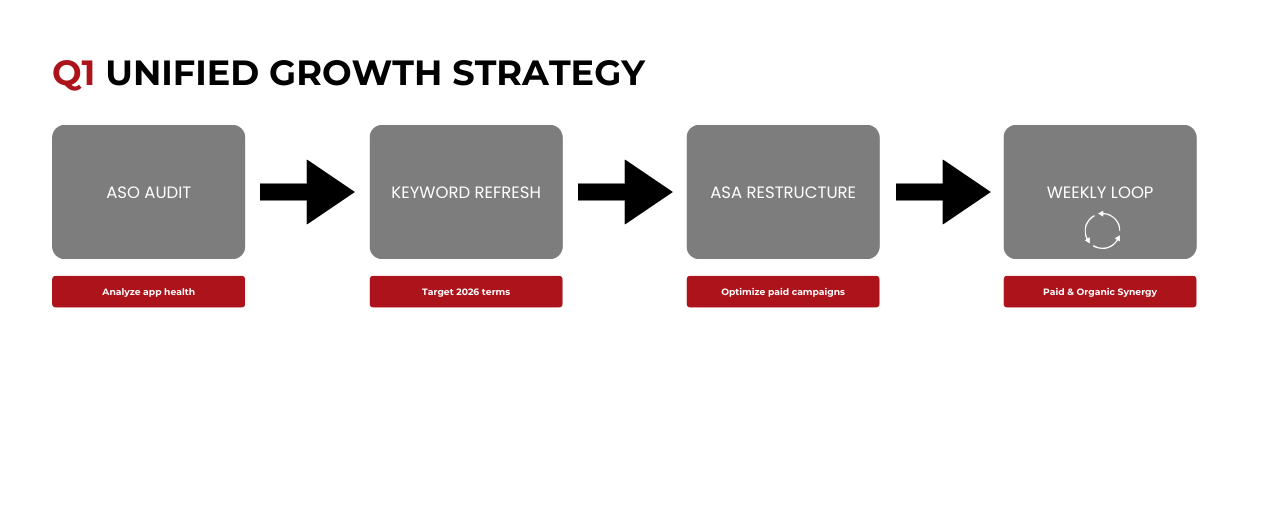
This playbook walks through the four pillars of Q1 planning: the ASO audit, keyword refresh, ASA campaign restructuring, and the feedback loop that ties paid and organic together.
Part 1: The Q1 ASO Audit
Before optimizing anything, you need a clear picture of where you stand. An ASO audit isn't a one-time event, it's a quarterly discipline. Q1 is the ideal moment to run one.
Visibility Check
Start with your keyword rankings. Pull your current positions for 50-100 target keywords and segment them:
- Top 10 → Strong → Defend and monitor
- 11-30 → Opportunity → Prioritize for optimization
- 31-50 → Weak → Evaluate relevance and competition
- 50+ → Not ranking → Replace or deprioritize
Ask yourself: Where do competitors rank that we don't? Gaps in your keyword coverage are opportunities hiding in plain sight.
Next, audit your indexed metadata:
- App Name (30 chars): Does it include your highest-priority keyword alongside your brand?
- Subtitle (30 chars): Is it complementing the App Name or duplicating it?
- Keyword Field (100 chars): When did you last refresh it? Are you using every character efficiently, no spaces after commas, no plurals, no repetition of App Name terms?
A common Q1 discovery: keywords that performed well in 2024 have become more competitive or less relevant. The search landscape shifts constantly. Your metadata should shift with it.
Conversion Check
Visibility means nothing if users don't convert. Review your product page performance:
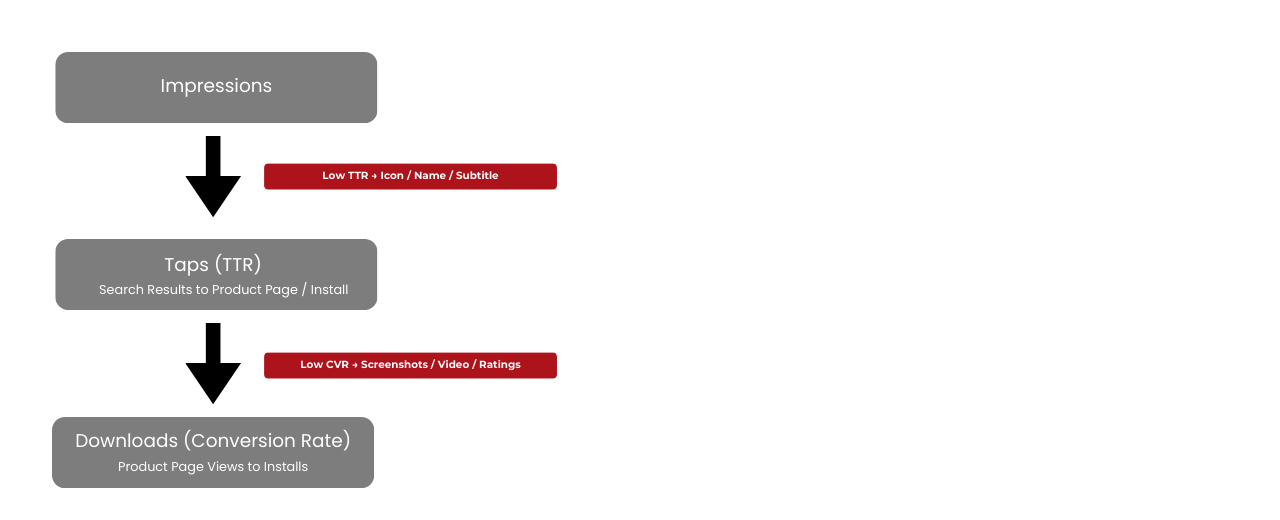
- Impressions → Taps (TTR): Are users tapping on your app from search results? Note that TTR can reflect taps to your product page or direct installs via the "Get" button in search results, both indicate relevance and appeal in the search context.
- Product Page Views → Downloads (Conversion Rate): Once they land on your product page, are they installing?
If TTR is low, your icon, App Name, or subtitle may not be compelling against competitors in the search results. If conversion rate is low, your screenshots, preview video, or ratings are likely underperforming.
Benchmark yourself against category averages. If you're below the 50th percentile on conversion, that's your Q1 priority not adding more keywords.
Quick Screenshot Audit
- Do the first 3 screenshots (visible without scrolling) communicate your core value?
- Is the text readable at thumbnail size?
- Does the visual style feel current or dated?
If you haven't refreshed your creative assets in 6+ months, Q1 is the time.
Part 2: The Keyword Refresh
Keyword optimization isn't a set-and-forget exercise. User language evolves, competitors shift their targeting, and Apple's algorithm updates change what ranks. Q1 is your keyword spring cleaning.
Building Your 2026 Keyword Bank
Start with four sources:
- Apple Search Ads Search Match data: Your ASA campaigns have been discovering what users actually search. Export your Search Match results from Q4, these are real queries that led to taps and installs.
- Competitor analysis: What keywords are your top 3-5 competitors ranking for that you're missing? Tools like AppTweak, MobileAction, or Sensor Tower surface these gaps.
- ASO tools keyword tracking: Platforms like AppTweak, MobileAction, or Sensor Tower show which keywords you're ranking for and where you're gaining or losing positions. Look for terms where you rank but underperform on conversion (messaging mismatch) or terms where competitors rank that you're missing entirely.
- User language: Read your recent reviews and support tickets. How do users describe your app? Their words often differ from marketing language and those words are what they search.
Prioritization Matrix
Not all keywords are equal. Score each keyword on:
- Relevance (1-5): How accurately does it describe your app?
- Volume (1-5): How many users search for it?
- Difficulty (1-5): How hard is it to rank?
Priority Score = Relevance × (Volume ÷ Difficulty)
Focus Q1 effort on:
- High relevance, medium volume, low difficulty → Quick wins
- High relevance, high volume, medium difficulty → Strategic targets
Avoid the trap of chasing high-volume keywords where you have no realistic chance of ranking. A #3 ranking on a medium-volume keyword drives more installs than a #85 ranking on a high-volume one.
The iOS Cross-Localization Advantage
Here's a tactic many teams underutilize: iOS indexes keywords from multiple locales. If you target the US, Apple also indexes your UK English, Spanish (Mexico), and French (Canada) keyword fields.
This effectively gives you 300+ indexed characters instead of 100. Use your secondary locales for keyword variations, synonyms, and long-tail terms that don't fit in your primary keyword field.
Part 3: ASA Campaign Structure for Q1
If your Apple Search Ads campaigns have been running on autopilot, Q1 is the time to restructure for efficiency.
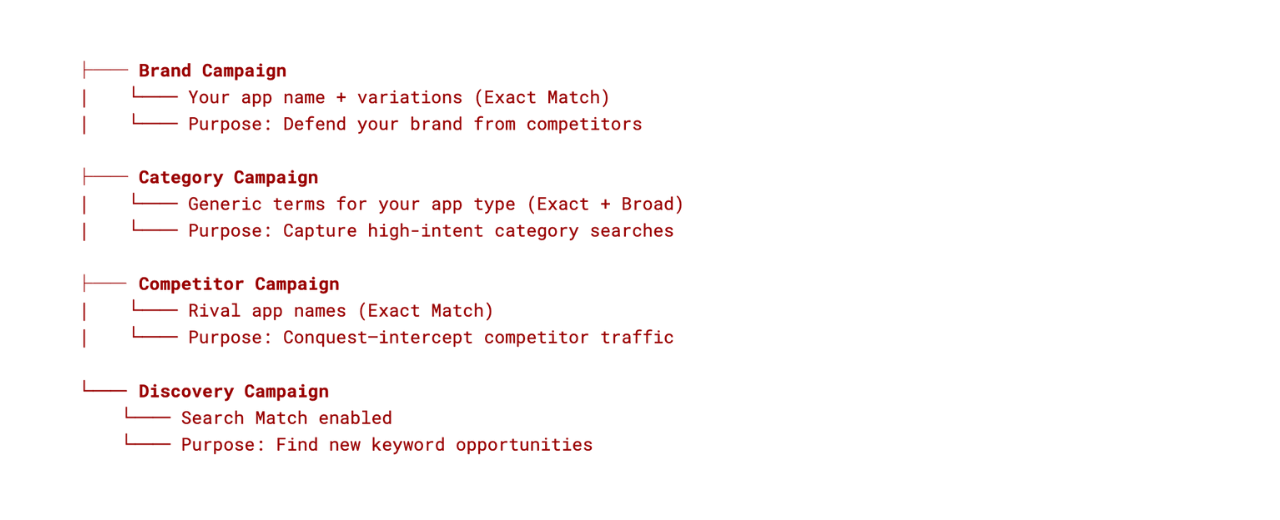
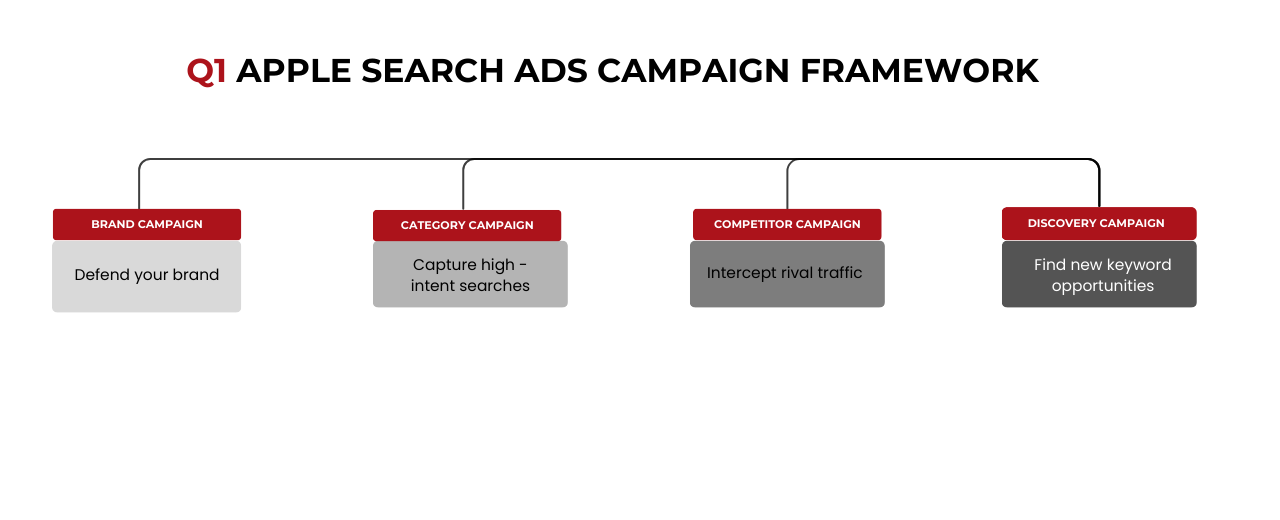
The Four-Campaign Framework
A clean campaign structure separates intent and allows proper budget allocation:
Q1 Budget Allocation
- Brand: 10-20% → Maintain, don't let competitors steal your traffic
- Category: 40-50% → Scale winners from Q4, test new keywords
- Competitor: 10-20% → Evaluate CPA,conquest is expensive, be selective;
- Discovery: 15-25% → Increase slightly in Q1 to find 2026 opportunities
If you're unsure where to start, increase Discovery budget in January. The goal is learning, you'll harvest those discoveries into your Category and Brand campaigns by February.
The Search Match → Exact Match Pipeline
Your Discovery campaign should feed your other campaigns. Here's the weekly workflow:
- Export Search Match terms from the past 7 days
- Identify terms with 5+ taps and positive conversion
- Add winners as Exact Match keywords in your Category campaign
- Add irrelevant terms as Negative Keywords in Discovery
- Repeat weekly
This pipeline turns Apple's algorithm into your keyword research assistant. By end of Q1, you'll have a refined keyword set validated by actual user behavior, not guesswork.
Custom Product Pages (CPP) for Q1
If you're running ASA without Custom Product Pages, you're leaving conversion on the table.
CPPs let you create up to 70 alternate product pages, each with different screenshots, preview videos, and promotional text. Assign them to specific ad groups so users see messaging that matches their search intent.
Q1 CPP priorities:
- Feature-specific keywords → Highlight that feature in first 3 screenshots
- Competitor keywords → Emphasize your differentiators
- Use-case keywords → Show that use case in action
A user searching for "budget tracker" should land on a CPP showcasing your budgeting features, not your generic product page that leads with social features.
Part 4: The ASA-ASO Feedback Loop
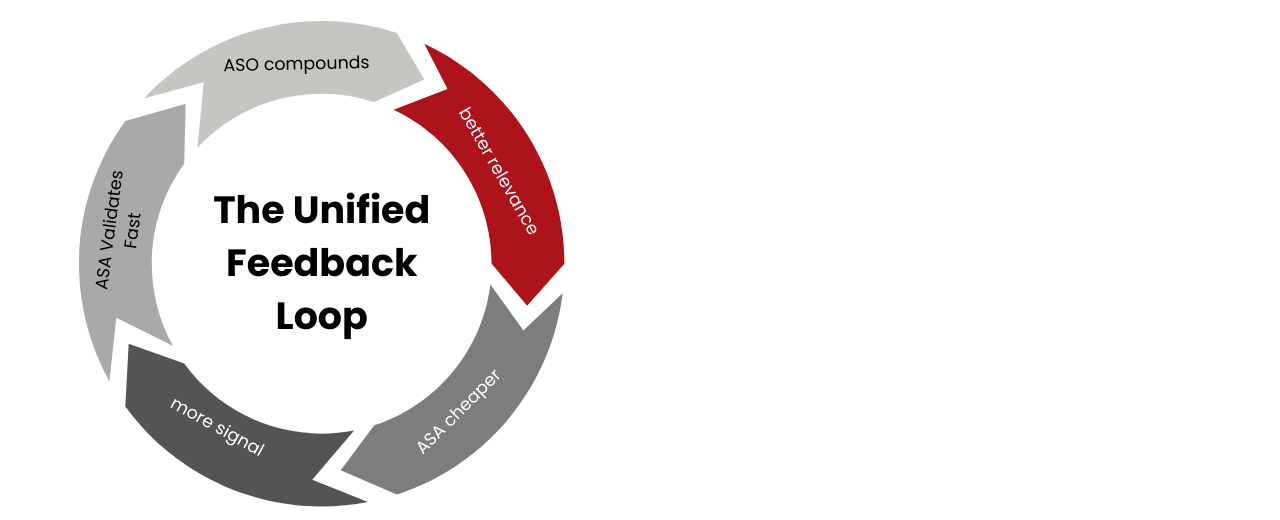
The most sophisticated app marketers don't treat ASA and ASO as separate channels. They build a feedback loop where each informs the other.
How ASA Informs ASO
Your paid campaigns generate data faster than organic can. Use it:
- Keyword validation: If a keyword converts well in ASA (low CPA, good downstream retention), it deserves a spot in your organic metadata.
- Creative testing: Test screenshot messaging via CPPs in ASA before committing to your default product page. Paid traffic gives you statistical significance faster.
- Audience insights: ASA demographic data (age, gender, location) reveals who actually converts, not just who you think your audience is.
How ASO Informs ASA
Strong organic performance reduces paid costs:
- Quality Score: Apps that convert well organically tend to have better relevance scores in ASA, lowering CPT.
- Keyword seeding: Keywords where you already rank organically (positions 5-15) are prime ASA targets, you have relevance, you just need the boost.
- Creative learnings: High-performing organic screenshots tell you what resonates. Use those messages in your ad variations.
The Unified Keyword Strategy
By end of Q1, your keyword strategy should look like this:
- Discovery (ASA): Search Match finds opportunities
- Validation (ASA): Exact Match tests conversion
- Scale (ASA): Increase bids on winners
- Organic (ASO): Add validated winners to metadata
- Defend (ASA): Bid on your brand + top organic keywords
This isn't a one-time setup. It's a continuous loop you run monthly throughout 2026.
Your Q1 Action Checklist
Week 1-2: Audit
- [ ] Run full keyword ranking analysis</span>
- [ ] Audit metadata for all indexed fields</span>
- [ ] Review conversion metrics vs. category benchmarks</span>
- [ ] Analyze Q4 ASA Search Match discoveries</span>
Week 3-4: Plan
- [ ] Build 2026 keyword bank with prioritization scores
- [ ] Restructure ASA campaigns into four-campaign framework;
- [ ] Identify CPP opportunities for top keyword themes
- [ ] Set Q1 budget allocation by campaign type
Week 5-8: Execute
- [ ] Update App Name, Subtitle, and Keyword Field
- [ ] Refresh screenshots if conversion is below benchmark
- [ ] Launch new ASA campaign structure
- [ ] Create and assign CPPs to relevant ad groups
- [ ] Establish weekly Search Match → Exact Match pipeline
The Compound Effect
The work you do in Q1 compounds. A keyword discovered in January and validated in February becomes an organic ranking driver by April. A CPP tested in Q1 becomes your default page creative in Q2.
Apps that treat ASA and ASO as a unified system, not separate line items, consistently outperform those that silo them. The feedback loop isn't a nice-to-have. It's the difference between incremental gains and exponential growth.
Start 2026 with clarity. Audit your current state, refresh your keywords, structure your campaigns for learning, and build the loop that ties it all together.
Your Q1 sets the trajectory. Make it count.