Apple Search Ads Waste: What to Check Daily, What Not to Cut
Most people open Apple Ads, the platform Apple renamed from Apple Search Ads, only when something smells off. They sort the account by spend, find the one expensive keyword sitting at the top, cut it, and close the tab. That feels like a waste check. It isn't. It's a habit without a trigger, and it finds the cheap obvious leak while the expensive invisible one keeps running underneath.
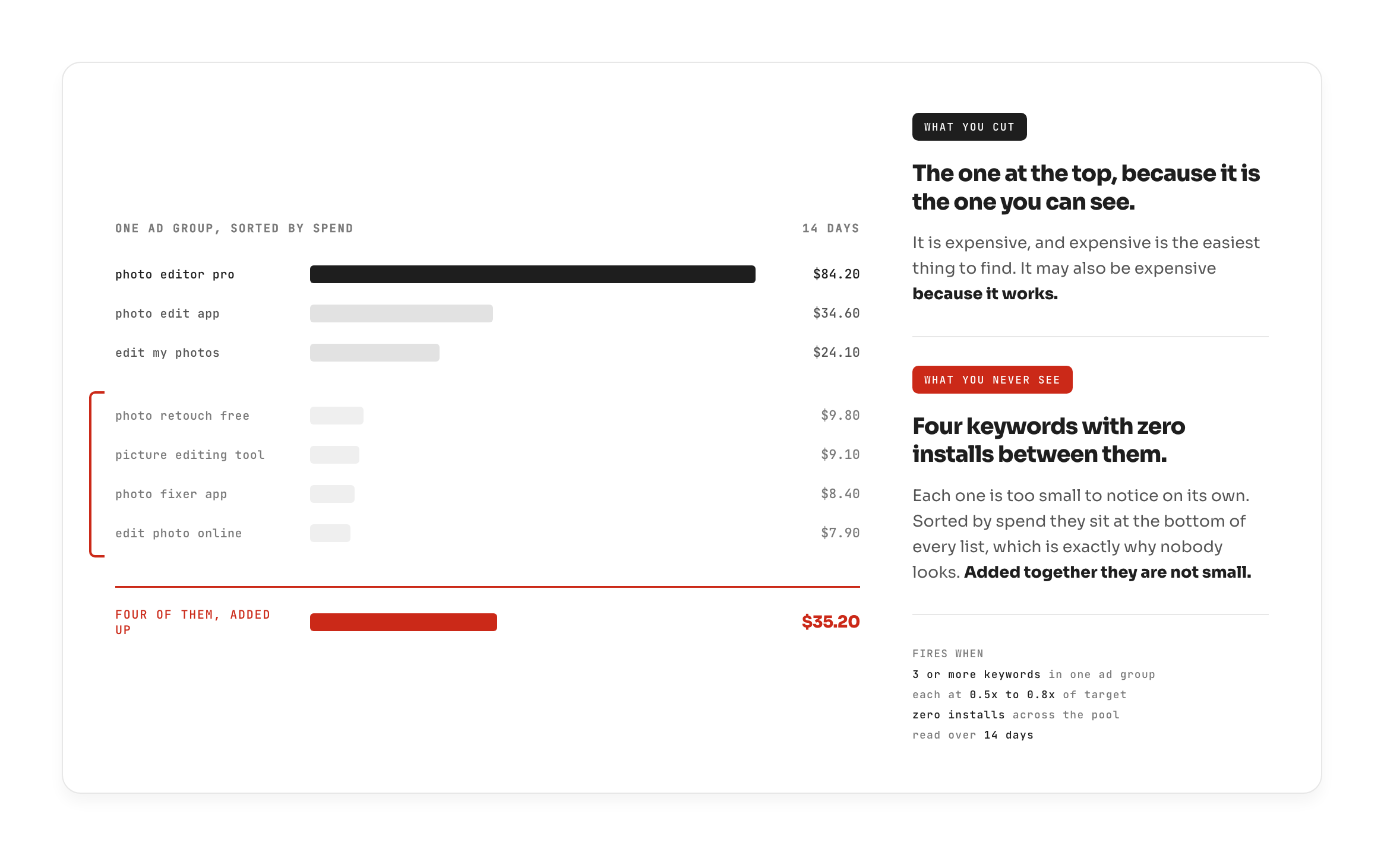
The pool that actually hides is not one big keyword. It's crumbs, three or four keywords at the bottom of every spend-sorted list, each too small to notice, which is exactly why nobody notices them. Sorting by spend guarantees you never see them.
By the end of this you'll have a daily read that starts one floor above the account, descends into Apple Ads only when something sends it there, and tells you, just as often, what to leave alone.
Start one floor above the account
A waste check is not a chore you perform on a schedule. It's a conditional read you earn the right to make. Something upstream has to send you there.
Think about walking into a room. You find a cup of tea. If the tea is still hot, someone was here minutes ago, seal a three-kilometre perimeter and move now. If the tea is stone cold, they left last night and could be four hundred miles away. Same room, same object, opposite action. The reading only means something inside a chain: what your goal was, which direction it deviated, which domain that sends you to, and what the evidence rules in and rules out.
Wasted spend is the tea. It is never the verdict on its own. So you don't start a waste check inside Apple Ads. You start at the one number you watch every day, and descend only when it moves.
The chain, in your language
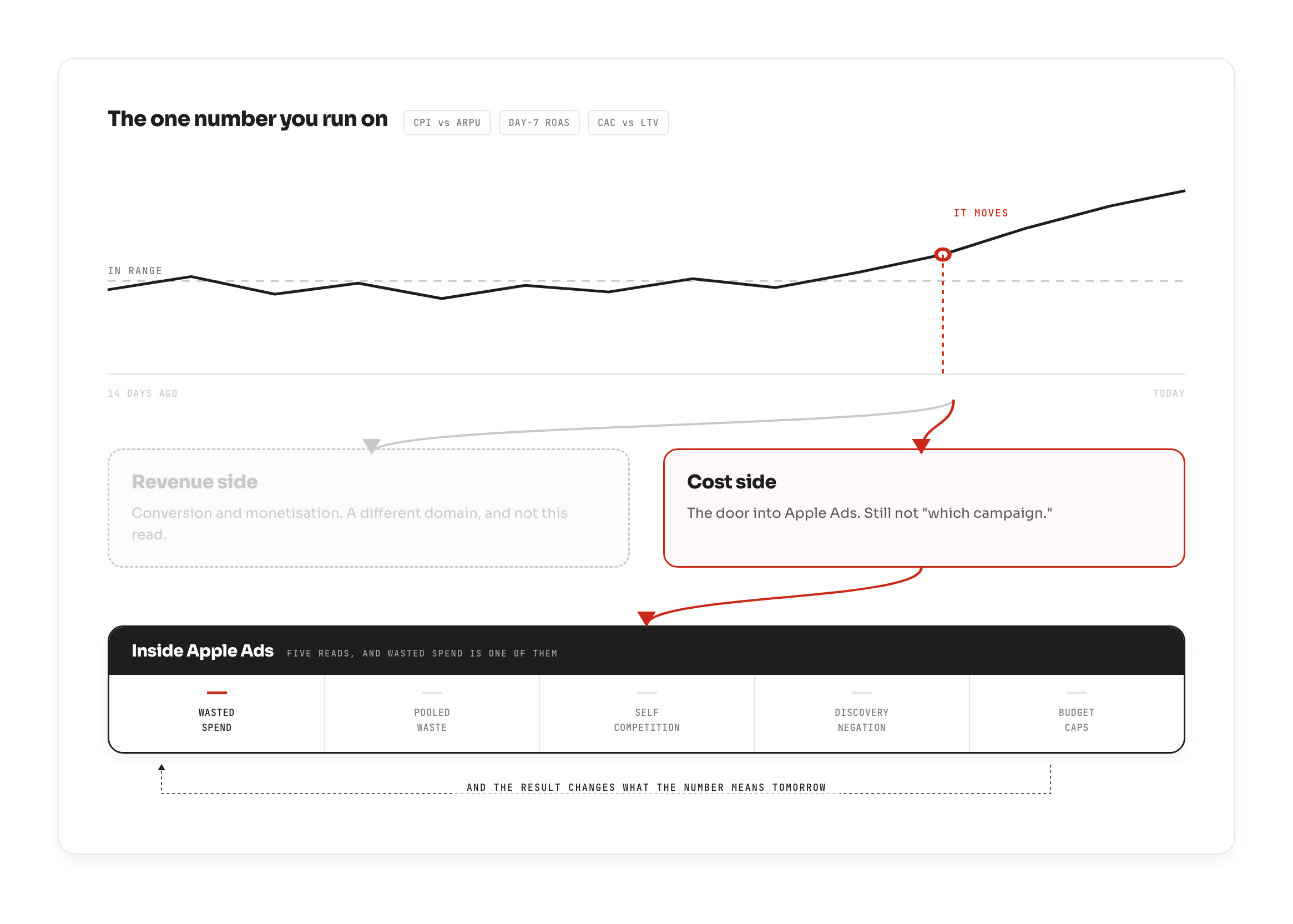
You run on one number for your stage: CPI against ARPU, day-7 ROAS, or CAC against LTV, whichever your stage uses. That's the daily watch. Everything else hangs off it.
Before anything, name your target event, because it decides what "waste" even means. An install goal, a trial goal, and a purchase goal are the same threshold pointed at three different things. On an install-goal account, a keyword delivering cheap installs is fine, it's doing its job. On a trial-goal account, that same keyword producing installs and no trials is waste outright, not a secondary signal to file away. Every multiple in this post is a multiple of your target event cost, never a generic CPA.
When the number deviates, the first fork is not "which campaign." It's revenue side or cost side, and those send you to two different domains. A revenue problem lives downstream, in conversion and monetisation. A cost problem sends you into Apple Ads where, importantly, wasted spend is one read among several, not the whole of it.
And the result writes back to the top. What you conclude tonight changes what the daily number means tomorrow. This is a loop, not a checklist.
What actually fires, and at what threshold
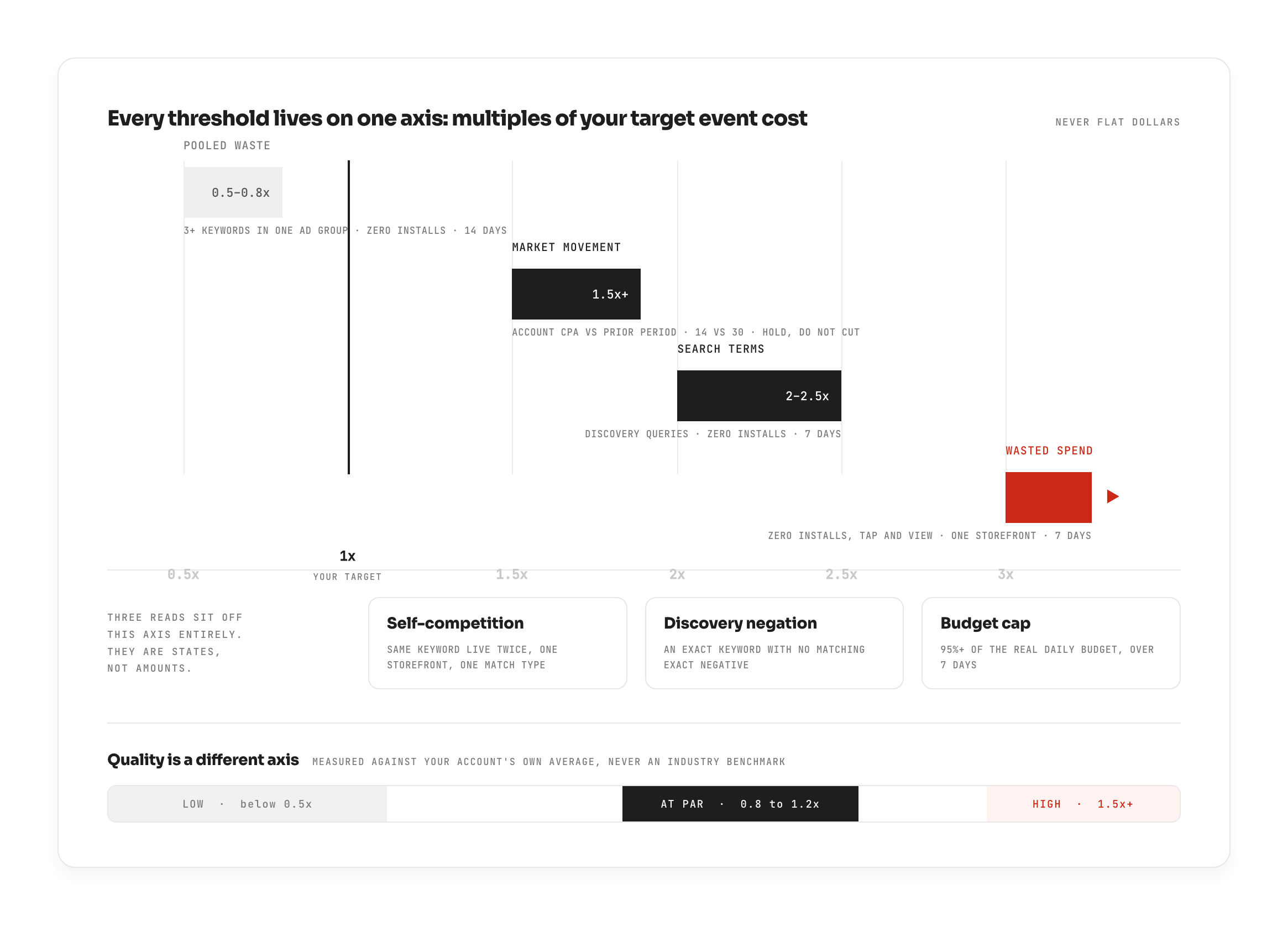
Thresholds scale to your target event cost. Never a flat dollar floor, a flat floor means one thing in a $0.60 hyper-casual market and something entirely different in a $40 finance vertical, and it means something different again in every currency you run.
Wasted spend proper is the clean case: one storefront, last 7 days, zero installs on both tap-through and view attribution, spend past 3x your target. Notice what is not a gate here, tap-through rate and conversion rate are deliberately excluded. When nothing came back at all, there is no conversion to diagnose. The absence is the finding.
For everything else, judge quality metrics against the account's own average, never an industry benchmark. Your account's normal is the only benchmark that tells the truth about your app. The bands: below 0.5x of your average is low, 0.8x to 1.2x is par, 1.5x and above is high.
The windows matter because different leaks accumulate at different speeds:
- 7 days at keyword level
- 14 days for pooled waste, because crumb spend builds up slowly
- 14 days against the prior 30 for market movement
Always in local currency. Converting a multi-storefront account into a single reporting currency destroys what "expensive" means inside each market.
And no minimum spend floor, which is the opposite of the usual advice, so it's worth saying why. The target-cost multiples already gate small spend automatically: a keyword can't cross 3x target on pennies. A flat floor on top of that adds nothing except a blind spot, and it puts that blind spot exactly where the invisible pool lives.
After the trigger, the judgement
The trigger is arithmetic. What you do next is judgement, and this is where the expertise actually sits.
Once a keyword fires, read its relevance through tap-through rate against your own account average:
- Far below your average, this is a relevance problem. You are the wrong app for that query. The auction is telling you people saw you and moved on.
- At or above par, with zero installs, the loss is downstream, not the keyword. The ad won the tap and you lost the person afterward. The keyword did its job; something after the tap did not.
Which means the keyword decision and the creative decision are two different decisions. A keyword nobody installs from despite a healthy tap-through is very likely a store-page problem, not a bid problem. Do not cut a keyword to fix a stale screenshot. You'll kill a working input to patch a broken output.
The leaks that hide from a spend-sorted list
(This is field logic, how the read reasons through an account. Not every case below is machine-detectable; the honest scope is drawn clearly at the end.)
Pooled waste is the one that gets missed the most. Three or more keywords in one ad group, each sitting in the 0.5x to 0.8x band, zero installs across the whole pool, over 14 days. Sorted by spend, they sit at the bottom of every list, which is why nobody sees them. Added together, they are not small. One caution before you act: a keyword with healthy tap-through and too few taps to convict is an unfinished experiment, not waste. Buying it a real read costs money, and that's a decision, not a cleanup.
Search terms, one level below keywords, are the actual queries a discovery campaign spent on. Judge them at a looser 2x to 2.5x, because discovery is exploratory by design. Long-tail queries often have no competitive data anywhere, that is not a reason to wait. Spend above the line with zero installs is enough on its own.
Self-competition is the same keyword live more than once in one storefront and one match type. The walls matter here: US against UK is not cannibalisation, and one exact plus one broad copy is normal, intended behaviour. Only a genuine duplicate inside the same storefront and match type counts. Which duplicate survives is a strategy judgement, not a number.
Discovery negation is the quiet one. Every exact keyword running anywhere in a storefront should also exist as an exact negative inside that storefront's discovery campaigns. Without it, the account pays twice for one search, out of two separate budgets, competing against itself.
Budget caps are the opposite of waste, money the account is refusing to make. A campaign averaging 95% or more of its real daily budget over 7 days is capped. Two honesty notes before you raise anything. First, check whether one or two keywords take 80% of the ad group's spend, because raising the budget mostly feeds them, not the pool. Second, a budget that stops because you scheduled it to stop is not a cap. The read is "check this," not "you're losing money."
What looks like waste and is not
This section and the next are the reason this is a way of reading an account, not a checklist. Both are about restraint.
Payback outranks price, and the order is strict: payback first, then install maturity, then whether the market moved, then competition. Nine times out of ten, a keyword is expensive because it works, that is precisely why competitors piled onto it. If payback clears, stop. The cost is justified, and the only open question is how long you want to stay in the bid war. Reversing this order, cutting on price before checking payback, is how accounts kill their best keywords.
Here is exactly that case from production. A keyword spending €521 over the window, 62 installs at €8.42 against a €5.17 target. On price alone it looks like an obvious cut: 1.6x over target, real money. It was held as a watch, not cut, because the blocking limitation was that the installs' own trials hadn't yet elapsed, so the payback couldn't be read. A cut on the surface number would have removed a keyword that might well be converting. The verdict was "re-read on a set date," with the limitation named out loud. That is the discipline: an install is unreadable until its own trial has elapsed, and counting a mid-trial user as a failed conversion is how healthy keywords get killed.
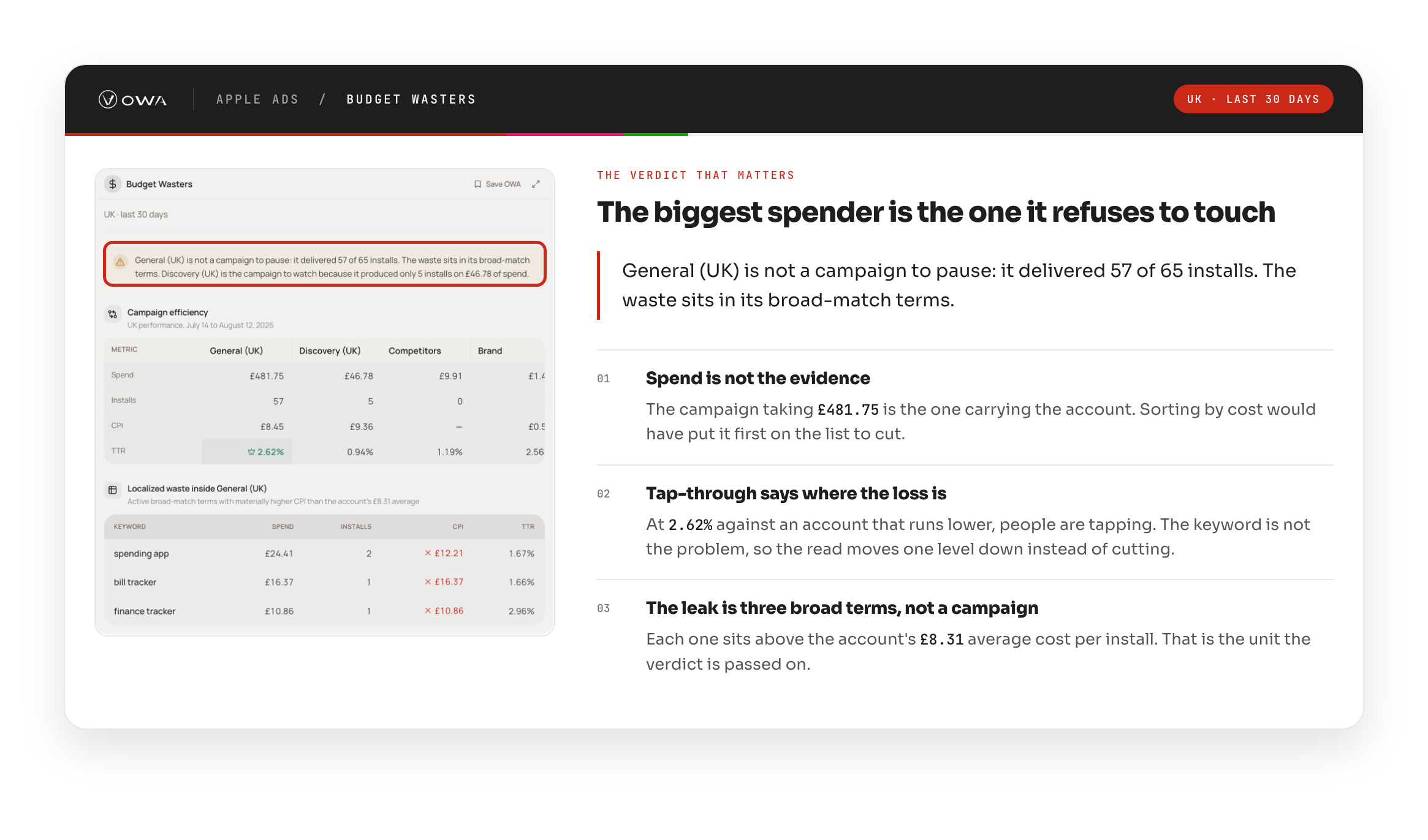
On a market-move night, hold. If your account CPA over 14 days sits 1.5x or more above the prior 30, the auction moved, not your keyword. Read this at account level, never keyword level, then drill in order: which campaigns drove it, which keywords, whether a competitor grew, and whether tap-through fell at the same time. That last one is the fork. If tap-through held, the market moved. If it fell, your creative went stale. Either way, cutting on a market night is the most expensive click in the account, because that volume does not come back.
Two smaller rules that save accounts from themselves. Only live things conflict, a paused campaign holding the same keyword is debris, not competition. And a detection unit is not an action unit: a pool raises one finding, but verdicts are passed one keyword at a time, never as a batch pause. When the data to decide simply doesn't exist, say so. A missing read is a stated gap, not an invented verdict.
What looks fine and is not
The mirror of the last section. Some of the worst leaks wear a good number.
(Field logic again, post-install quality is how the read reasons, drawn from data a channel alone doesn't hold.)
A cheap install is not proof. Revenue is. A keyword hitting your cost target while producing no trials, or trials that never convert is a leak wearing a good number, and it will never appear on a waste list sorted by cost. It looks like a win right up until you check what happened after the install.
Which is why post-install quality gets checked on every keyword, regardless of CPA. A good cost never earns a skip. The keyword that comes in cheap and dies at the paywall is invisible to every check that stops at install.
And when you do decide to withdraw from a keyword, the exit is gradual, not a single cut. Reduce bids and pull back slowly, confirming the read as volume comes down. A one-shot pause throws away the evidence that would have told you whether you were right.
Where the fix actually lives
Often, not in the channel that found it. A keyword nobody taps can be a store-page problem. Zero installs with a healthy tap-through is almost never a bid problem. The cost read surfaces the symptom; the fix frequently lives one domain over.
Naming the handoffs concretely, without walking through those doors here:
- A custom product page is the paid landing page that Apple Ads and Meta both point traffic at. When the ad wins the tap and the page loses the person, that's where the fix lives.
- Product page optimization tests your default page against organic traffic, so no paid channel owns it, it is not an Apple Ads decision at all.
- Paywall and onboarding are never reached directly from a channel. They come through the post-install read, from the revenue side of that very first fork.
The cost read tells you which door. It does not open it.
The daily loop
Short, and named. A procedure for reading, not a prescription for cutting.
1. Read the one number each morning, your CPI-vs-ARPU, day-7 ROAS, or CAC-vs-LTV. If it's in range, you're done. A calm number is a complete answer.
2. If it moved, take the first fork:revenue side or cost side. Only the cost side sends you into Apple Ads.
3. Descend into the account and let the thresholds fire, wasted spend, pooled waste, self-competition, discovery-negation gaps, budget caps, each judged against your own average, in local currency.
4. Diagnose before you decide. Read tap-through for relevance, separate the keyword decision from the creative decision, and apply both mirrors: is this expensive-but-working, or cheap-but-leaking?
5. Pass verdicts one keyword at a time, watch where the data can't yet convict, and write the result back to the top of the loop.
Doing this nightly
Everything above is runnable by hand. It should read that way, there's no secret step, no black box. The only thing that isn't human-scale is doing it nightly, across every keyword and every storefront, without ever skipping the boring pooled crumbs at the bottom of the list.
That is the part OWA runs. What ships today: nightly detection of wasted spend, pooled waste, self-competition, and discovery-negation gaps; budget-cap detection with the spend-hog check built in; market-move shielding so the system holds instead of cutting on an auction night; thresholds scaled to your app's own target; every quality metric judged against your account's own averages; tap-through relevance diagnosis; one-tap fix plans; and watch-instead-of-cut wherever the data can't prove a verdict yet.
What that looks like in practice: in a single night, on one account, the system produced one card covering 5 discovery campaigns and 100 missing exact negatives, the account paying twice for a hundred searches, out of two budgets, against itself, with the fix plan attached and ready to apply. Finding that by hand means reconciling every exact keyword against every discovery campaign in every storefront, which is exactly the work no one does at midnight.
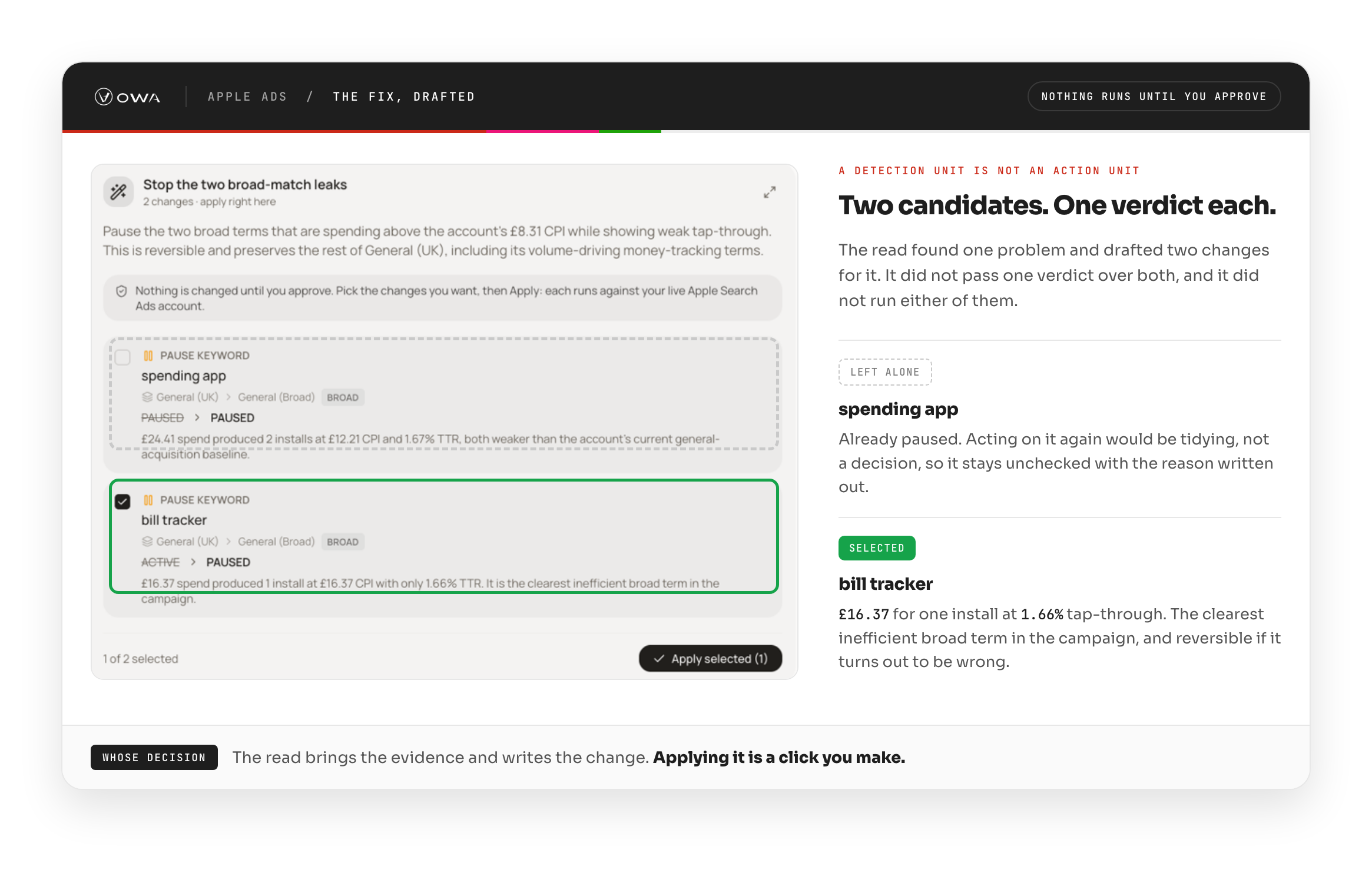
Watch the walkthrough to see the nightly read run on a live account, card by card.
A quiet night is a result
If every candidate was examined and every one earned a reason not to act, the read did its job. Nothing to cut is an outcome, not a failure, though both systems and people are wired to treat it as one, and to go find something to cut anyway. A list you couldn't read is reported as unread, never as empty.